This website uses cookies for visitor traffic analysis. By using the website, you agree with storing the cookies on your computer.More information

Category: Development

Migration from Eclipse Galileo to Indigo

We use Eclipse Galileo for all our projects. It has some problems with CPU load if you use Subclipse with large Java projects. But if you disable SVN decorators, it is ok (not perfect, but still better than the rest)...

We don't use every new Eclipse version for development because it needs a lot of time to check and change our projects. Don't believe that everything works out-of-the-box.

In the last days, we tried to update our Android plugin and... the new version does not support our "old" Eclipse version. We need at least Eclipse Helios... sh*t. We opted for the update, hoping that it does not take too much time.

Installation of Indigo and all our plugins was straight forward. But the "new" JDT have some side effects. It was not possible to compile JVx because KeyValueList and IdentityKeyValueList have a "Name clash". The problem details are described here. Not an Eclipse problem, a generics problem. But even that is not great.

After we set the compliance level for JVx from 1.5 to 1.6, it was possible to compile the project. Now we have Name clash warnings instead of errors. Not great but we can live with it. After we "solved" the first problem we had the next with our Web projects, because the Project Facets use Java 1.5 compliance level. But we learned that it is enough to set the level to 1.6 :) . To set the level from 1.5. to 1.6, we had to change the JRE for our Server environment(s) from 1.5 to 1.6. It is not a problem to use 1.6 but JVx is 1.5 compatible and it is not great to test without 1.5, but it is what it is.

Most of our projects are now migrated and again it was not funny to search "no" problems. We look forward to the next waste of time.

If you need details about our migration steps, write a comment ;-)

JVx 1.0

We proudly present JVx 1.0!

What a year... The first release of VisionX is out, and we finished our work on JVx 1.0.
This release is awesome. It contains a total of 230 changes to 0.9.

We implemented really cool productivity features, some fancy UI features and we fixed some bugs. But the complete list is really long :)

Our original Roadmap for 1.0 had fewer Features, but thanks to the community, JVx 1.0 now contains a lot of wonderful things.

In the following weeks we plan to write more documentation especially about the new features and update our showcase and demo apps. It is not possible to write about everything in this posting - and it is also Christmas. One of the next postings will be some statistics about the JVx source code - LoC, quality, ...

We think it is also time for more WebUI... maybe another implementation... let's see. And of course, mobile devices are still very interesting. We started first attempts with Android some months ago. We made some POCs with Pivot and JavaFx 2.0 and who knows what the next year brings.

And we have still a lot of new ideas to speed-up the development time. Without JVx 1.0 you develop as fast as possible - but with JVx 1.0 you develop with the speed of light.


Now, a very short look at JVx 1.0

  • Database
    • Support for PostgreSql and MySql enum datatypes (automatic link cell editors)
    • High performance metadata cache
    • Block fetching
    • Scriptable db import scripts
  • Server
    • REST support for all objects and actions
    • DetachedSession and DirectServerSession introduced
    • DirectObjectConnection introduced
    • Transparent config encryption
    • LCO based security checks
    • Reduced communication requests
    • Better support for custom storages
    • Support for custom session manager and object provider

  • User Interface
    • Intuitive link cell editors
    • New cell formatting with image and insets
    • JNLP services integrated
    • Focus rect handling
    • En/Disable translation per component
    • New Locale handling


You find the complete list in the Changelog.

And last but not least, we look forward to your feedback!

Mysql and PostgreSql enum/set support

MySql and PostgreSql have some useful custom datatypes. Enum is one of them. MySql has a Set datatype too.

With an Enum, you define a list of allowed values, but only one value is possible for the column (same behaviour as check constraints in other databases)

With a Set, you define a list of allowed values and multiple values are possible for the column (more like a n:m relation). But you should not use Set datatypes, because it makes your data model unreadable and everyone wants clean data models?

With JVx 1.0 it is possible to use Enum or Set datatypes. On UI side you get a link cell editor (dropdown) or choice cell editor (e.g. checkbox).
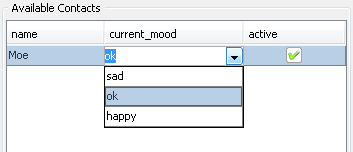
Look at the image on the right. You see 3 columns. The first is a simple text column, the second is a linked cell editor (dropdown) and the third is a checkbox. Nothing special?

Not until you see the database table.
  Enum and Set

The table and types, in PostgreSQL, are defined as:

CREATE TYPE mood AS ENUM ('sad', 'ok', 'happy');
CREATE TYPE yesno AS ENUM ('Y', 'N');

CREATE TABLE person
(
   name text,
   current_mood mood,
   active yesno
);

The server-side storage handles the enum/set detection automatically and sets the linked cell editor and allowed values into the MetaData. You don't have additional work on UI side to get above table!
And this is really cool, isn't it!

But we recommend a new creation style for your storages in your life-cycle objects, to get the new features:

Old style:

DBStorage dbs = new DBStorage();
dbs.setDBAccess(getDBAccess());
dbs.open();

New style:

DBStorage dbs = getDBAccess().createStorage();
dbs.open();

Why we recommend this?

With 1.0 we introduce db specific storages like MySqlDBStorage and PostgreSQLDBStorage. This storages support database specific features that are not standardized.
We avoid/reduce boilerplate code whenever possible and who wants to change source code if the database is changed?

With the new style, you get the best storage available for your database, automatically. Of course it is possible to create e.g. a MySqlDBStorage() manually, but keep in mind that you are fixed to MySql.

After you changed your life-cycle objects, you get linked cell editors for your enum columns. But in many cases you use enum datatypes as check constraints e.g. Yes/No columns. In that case, a linked cell editor is not very cool - you need a choice cell editor.

JVx defines some default choice cell editors, via

UIChoiceCellEditor.addDefaultChoiceCellEditor(ApplicationUtil.YESNO_EDITOR);

in the Application class. With this mechanism it is very easy to define choice cell editors for your enum types.

Set datatypes are very special and generally, we don't like unreadable data models. But JVx should support it as good as possible.

We handle Set datatypes like enum datatypes and we show a link or choice cell editor. The user can only select one value. A developer can set multiple values via API (as comma separated list).

Have you ever seen this comfort in other frameworks? Let us know ;-)

JVx 1.0 with REST support

Some of you asked us: When is JVx 1.0 available?

The answer was and is still: This year :)
More precisely: Planned release date is Friday, 23rd December.

The current version in our SVN repository is Feature complete. Only some tickets are still open, but all of them are not really important for 1.0. Some are beautifying and some are smaller bugs that do not hurt.
We are optimistic that these are done till Friday, otherwise the open tickets will be moved to Release 1.1.

In addition to numerous changes and new features, the REST support is certainly one of the most interesting innovation. The feature was not originally planned for 1.0, but it is cool nowadays.

But what do we understand as "REST support"?

Every server-side action, and every object that is available via a Life-Cycle object, are accessible via REST calls. Don't worry about security, because the same access checks are done as for common applications. If an action or object is available for an application, it is available via REST calls.
You don't need additional configurations for your applications, actions or objects - no annotations and no config files are needed.

It sounds simple? Yes, it is so simple!

I want to show you a short example, based on Restlet. We have a life-cycle object like the following:

public class Address extends Session
{
  public DBStorage getAddress() throws Throwable
  {
    DBStorage dbs = (DBStorage)get("address");
       
    if (dbs == null)
    {
      dbs = new DBStorage();

      dbs.setDBAccess(getDBAccess());
      dbs.setWritebackTable("ADDRESS");
      dbs.open();
               
      put("address", dbs);
    }
               
    return dbs;
  }

  public String getData()
  {
    return "Text data";
  }

}

The object has one action "getData" and the object "address".

Now we call the action:

String sHost = "http://localhost/jvx/services/rest/demo/Address/action/getData";

ClientResource cres = new ClientResource(sHost);

Representation rep = cres.get();

String sData = JSONUtil.getObject(rep, String.class);

And we fetch all records:

String sHost = "http://localhost/jvx/services/rest/demo/Address/data/address";

ClientResource cres = new ClientResource(sHost);

Representation rep = cres.get();

List liRecords = JSONUtil.getObject(rep, List.class);

Is it as simple as expected? We hope so ;-)

Of course, there are options for fetching only specific records. Insert new records, update and delete one or more records. All options are implemented in test cases. Have a look at the Action or Storage tests.

More details and the documentation will follow after the release of JVx 1.0.

JVx 1.0 beta-3 is available

It is available from the project page.

This version should be the last beta before release 1.0, but we changed our plan a little bit. VisionX starts the open beta phase in the next weeks and we want release VisionX 1.0 with JVx 1.0. Because of that, we extend the beta phase for JVx. The current beta of JVx is almost production ready but does not contain all features for 1.0.
A short delay should not be a problem for you, and our beta releases are always in high quality.

What’s different?

The current beta contains some very useful productivity features and a lot of important changes in our database access layer.

  • AbstractBean serialization

    Our AbstractBean is an instance of Map and because of that we serialized objects as Map. That worked well but produced a ClassCastException when you tried to cast the serialized object to the wrong type. Now it is clean!

  • StackTrace manipulation

    Stack Trace Elements of SecurityExceptions are now shrinked, because it is not clever to show all details on the client. If you need the whole Stack Trace, enable debug logging for AbstractSecurityManager.

  • Live config

    In production use, a Master session caches the application configuration and changes are not considered until you create a new Master connection. If you need up-to-date sessions, you have now an option. Add:

    <liveconfig>true</liveconfig>

    to your server config.xml.

  • Virtual Filesystem support

    Versions prior 1.0 beta-3 have deployment restrictions for some application servers. JVx works without problems with all application servers but e.g. JBoss uses two different deploment modes. As application archive (.war) or "exploded". If you tried to install a JVx application as war, you had the problem that config files were not found. The problem does not occur if you install the application "exploded". With the current beta, the problem is solved and JVx applications work as war or "exploded".

  • Openness

    We introduced a new ISession implementation called DetachedSession. With this Session it is possible to work "outside" the JVx lifecycle. You can create a DetachedSession from a Servlet, a Filter or wherever you want. All you need is the application name. The session has its own SecurityManager and allows fast username switching. You need at least one DetachedSession for your external services. Thats saves time and memory.

    The AbstractSecurityManager got new methods to create SecurityManagers for any ISession or just for an application name. You can now use the JVx authentication mechanism for you third party services, without much coding effort.

    Furthermore, our DBSecurityManager allows connection access. Use the connection of the security manager to save connections.

    A practical example for above changes is the integration of REST services, with or without authentication. Now it is enough to create a new DetachedSession and use the configured security manager to authenticate clients, e.g.:

    DetachedSession sess = new DetachedSession("demo");

    DBSecurityManager secman = (DBSecurityManager)sess.getSecurityManager();

    sess.setUserName("jvx");
    sess.setPassword("beta-3");
    secman.validateAuthentication(sess);

    sess.setUserName("visionx");
    sess.setPassword("v1.0");
    secman.validateAuthentication(sess);

    Connection con = secman.getConnection();
    //Execute queries

  • Database access

    We fixed some problems with PK, FK and UK detection for all supported databases. Now our automatic link cell editors work without database restrictions.

Check the Changelog for a complete list, and use our Forum to talk with us ;-)

JVx link cell editor

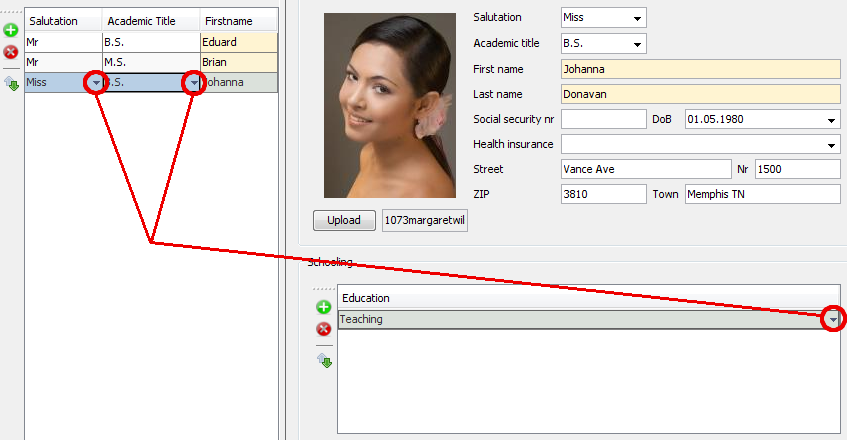
We have a cool new JVx feature for all developers! It has always bothered us that the Link Cell Editors are not visible in the tables. You don't see the difference between date/text/number and link cell editors. Now you see the difference!

I hope you find the difference in the following screenshot ;-)

Link Cell Editor mark

Link Cell Editor mark

The new feature is available with JVx 1.0 beta 3 or in our source repository.

JVx 1.0 beta-2 is available

It is available from the project page.

What’s different?

This beta release contains important bugfixes for database access and brings some useful utility methods. It was a lot more work as expected, to solve the problems, but now we are very happy with it. Beta-2 is a smaller update, compared to beta-1 but we are already working on beta-3.

And of course we are also working under high pressure on VisionX. The tool is so amazing. Application development of the next generation. We have some really cool videos for you on our YouTube channel. Feedback is always welcome.

Check the Changelog for a complete list, and use our Forum to talk with us ;-)

JVx 1.0 beta-1 is available

It is available from the project page.

What’s different?

The current version is our first release on the way to 1.0. It contains not a lot of new features and most of them are in the backend. We had a lot of work with some Problems with our DataBook in DataSource Writeback Isolation Level and with Multi Threading. But we are very satisfied with the release!

  • DataSource Isolation level

    Compared to the DataRow Level, a DataBook does not save immediate. The mix of databooks with DataRow and DataSource Level with different master references caused problems. Now it is not a problem to use different levels. It is great to use 1:n, n:m or even 1:1 relations with DataSource level, but call save when needed!

  • LifeCycle Objects

    If your LifeCycle objects extends from GenericBean, the destroy() method is now invoked after the connection is closed. If you don't extend from GenericBean, you can use the ILifeCycleObject and implement destroy(). It is now possible to close connections to remote systems or execute cleanup tasks. Note that DBAccess automatically closes the database connection.

  • Conditions

    The Conditions LikeReverse and LikeReverseIgnoreCase are new and work as follows:

    Like: column-value like user-value
    LikeReverse: user-value like column-value

  • Access control

    It is now possible to use a custom IAccessController for your DBSecurityManager. Simply set the full qualified class name in your config.xml:

    <application>
      <securitymanager>
        <accesscontroller>com.sibvisions...</accesscontroller<
    ...
  • Security Managers

    Security Managers have now a release method. This is important if you want to change the security manager because now it is possible to free all used resources.

  • Cell formatting

    It is now possible to configure images for rendered cells. Image and Text combinations in cells are now supported.

  • Utilities

    We added some useful methods to ResourceUtil, FileUtil, StringUtil and ArrayUtil. Introduced the new class TriggerAPI for server-side triggers.

  • Changes to 0.x
    • XmlNode.getValue() for an attribute with an empty value returns now null instead of an empty string.
    • UIImage.getImage("invalid") returns null instead of an UIImage instance without content. Be aware of NullPointer Exceptions.
    • logout method of ISecurityManager is only called for MasterSession and not for SubSession. Before 1.0 is was called for all Sessions.
    • estimatedRowCount of IStorage was renamed to getEstimatedRowCount
    • ResourceUtil searches local files only from directories which contains jar files and not for directories which contains class files. Now logging.properties per project are supported.

Check the Changelog for a complete list, and use our Forum to talk with us ;-)

Pivot - Hello

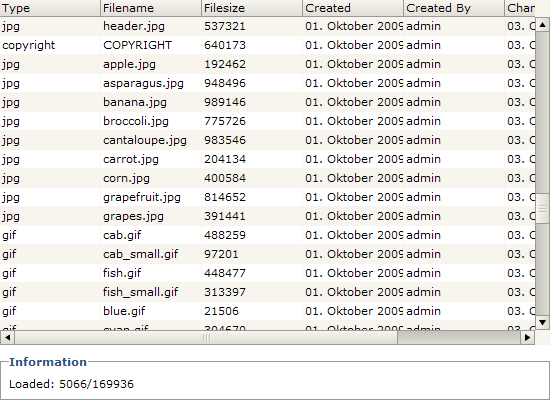
The UI framework Pivot offers modern UI controls and renders very clean and fast. It has very powerful features and we made a very simple load-on-demand TableView implementation. We used our JVx model, especially IDataBook, for the integration.

The result is a table that loads the data from a database (scroll down to see what happens). The database table contains about 170,000 lines.


The above example uses the same database as our Showcase application.
The Source Code is Open Source and available via SVN, on our JVx Project page.

JVx vs. JSP/Spring/Hibernate

We found a nice article about a simple CRUD application, created with JSP/Spring/Hibernate - read more....

This example is great for a comparison with JVx, because JVx is perfect for CRUD applications.

We used our existing app JVxFirstApp as reference because it is comparable to the Spring app. Our app has some extra features like authentication and a specific security manager, but that does not change anything.
Both applications provide CRUD operations on a table called CONTACTS. A big difference is the used technology: Web (JSP) vs. Desktop (Swing), but it is no extra coding effort to start our app as Web application - with our WebUI.


Why the comparison?

A big advantage of JVx is to simplify application development specifically of database applications. We want to show the difference in complexity and compare some statistics.
Let's start with the statistics:

    JSP/Spring/
Hibernate
  JVx
Files   17   9
LoC   265   208
Config lines   74   15
JSP lines   230   -
Libraries   37   2


We used the same code formatter for both projects, therefore the Lines of code should be meaningful. The config files do not contain a lot of empty lines and the jsp files are standard html. We counted every line.

As you can see there is a big difference. Less lines of code do not automatically mean less complexity, but in this concrete example is it so. If your application has few lines of code, it is easier to understand how things work together and it is easier to maintain your application. And if you are a beginner it is better to get fast results without losing the control. That is the case if your project contains many files.

And if you are not a beginner it is important that you have the best flexibility with your framework. Both technologies allow the unrestricted use of other frameworks. But more dependencies means more problems if you plan to update to newer versions. The testing effort should not be underestimated. Fewer dependencies are an advantage!


What is your opinion?