This website uses cookies for visitor traffic analysis. By using the website, you agree with storing the cookies on your computer.More information

Low-Code for Java Pros

Why the Combination of Desktop Tools and Flexible Deployments Works
in the Enterprise Space

In software development, two different worlds often clash: On one side are slow, complicated enterprise processes; on the other, modern cloud tools promise fast results, but quickly fail when facing complex business needs.

Particularly for Java developers and IT teams in the mid-market, the question arises: How can development time be drastically shortened without losing control over architecture, security, and the actual Java code?

A look at an alternative approach shows what a bridge between visual development, a robust Java basis, and flexible infrastructure can look like.


1. Why a Desktop GUI Designer Makes Sense in Professional Environments

While the trend in the no-code sector points almost exclusively to purely browser-based interfaces, professional software development offers weighty reasons for a different approach. A local, native desktop designer brings specific characteristics:

  • High Performance Without Browser Limits: Complex, data-intensive enterprise masks can be edited fluidly in a desktop application without performance drops caused by latencies or browser RAM limits.
  • Full Offline Capability: Developers can work undisturbed regardless of a stable internet connection - whether on a train or in secure environments.
  • Full Control: The code remains locally accessible and can be seamlessly linked with familiar IDEs like IntelliJ or Eclipse, rather than gathering dust in a pure cloud sandbox.

2. The Java Basis: Full Control and Direct Code Access

Classic low-code platforms often work with rigid generators or hidden black boxes where code must be laboriously exported to make adjustments. Here, it works differently:

  • Real Code as a Living Basis: There is no separate export step. The platform works directly on the actual Java code, which is changed and adapted live.
  • The Strength of the Java World: Instead of proprietary scripting languages, mature Java technologies are used. Existing libraries, frameworks, and internal corporate Java components can be easily integrated and controlled directly within the code workflow.

3. One Backend, Three Frontends: React, Flutter, and Vaadin

Projects today demand flexibility: Sometimes a modern web application is needed, other times a native mobile app for field staff, or a classic enterprise mask.

  • Centralized Logic: Business logic and data structures are defined once in Java.
  • Multichannel Output: From this, the system seamlessly serves modern React web interfaces, native Flutter apps, or proven Vaadin views.

This eliminates the need to build a completely separate development team for every single device type.

4. Flexible Deployments: From Docker to Classical Application Servers

Corporate landscapes are heterogeneous. While some companies consistently rely on containers, many established institutions have successfully worked with proven infrastructures for years.

  • Freedom of Choice in Hosting: The platform is not tied to a mandatory Docker environment. It can be operated either via modern Docker containers (cloud or private cloud) or deployed seamlessly on classical enterprise application servers within existing data center architectures.
  • Maximum Compatibility: This allows the software to fit smoothly into the already existing system landscape without requiring existing operating concepts to be overhauled.

Conclusion

There is no single way to build software. Whether browser or desktop, low-code or hard-code, Docker or application server - what matters is that the architecture fits the use case. Combining the robustness and openness of directly modifiable Java code with the speed of visual design tools and flexible deployment options creates a pragmatic alternative for demanding enterprise software.


We make all of this possible with VisionX.

One Codebase, Any Platform

Building Web, Mobile, and Desktop Apps with VisionX and AI

In modern enterprise software engineering, two major bottlenecks frequently slow down innovation: platform fragmentation across devices and vendor lock-in caused by proprietary low-code engines. Developers often find themselves maintaining separate codebases for web, mobile, and desktop applications, while being unable to leverage modern AI tools due to black-box platforms.

This is where VisionX changes the paradigm. Designed as an open, Java-based low-code application development platform, VisionX allows engineering teams to visually design data models, UIs, and business logic once - and deploy them seamlessly across Web, Mobile, and Desktop.


Cross-Platform UI Without Code Duplication

Unlike conventional rapid development tools that output fragile, proprietary runtimes, VisionX leverages a clean separation between application logic and rendering engines. This design philosophy enables true multi-platform output from a single application model:

  • Web Applications: Deploy highly responsive enterprise web portals and back-office tools running on standard web frameworks and HTML5/CSS standards.
  • Mobile Apps: Provide field workers and mobile users with responsive, touch-optimized interfaces designed specifically for iOS and Android devices.
  • Desktop Clients: Deliver high-performance, rich desktop interfaces for complex data entry, heavy multi-window workflows, and deep local peripheral integrations.

Clean Code & Pure Data Models: Supercharged by AI

A primary differentiator of VisionX is what happens under the hood: instead of generating proprietary metadata, VisionX outputs clean, standards-compliant Java source code and structured relational data models. Because there is zero hidden magic or black-box lock-in, your application codebase is fully accessible and human-readable.

This architectural transparency makes VisionX applications uniquely suited for AI-assisted development:

  • Compatibility with Any AI Platform: You can plug generated VisionX Java code into any LLM or AI coding assistant - such as OpenAI, Anthropic Claude, GitHub Copilot, Cursor, or local LLMs.
  • AI-Driven Business Logic: Developers can use AI prompts to generate complex algorithms, data transformations, or custom business logic in pure Java, then instantly plug them into VisionX Actions.
  • Clean Schema Reasoning: AI tools easily understand VisionX data models, enabling automated SQL optimization, automated unit test generation, or instant REST API extension.

Unrestricted Architecture: Ecosystem & Cloud Flexibility

Instead of forcing developers into a single closed cloud ecosystem, VisionX natively integrates with any modern technology stack, cloud provider, or deployment model.

1. Modern Serverless Backends (Supabase & Neon)

VisionX apps connect directly to modern PostgreSQL ecosystem powerhouses. Whether leveraging Supabase for real-time APIs, built-in storage, and row-level security, or Neon for instant database branching and auto-scaling serverless storage, VisionX treats these state-of-the-art backend layers as standard, first-class SQL data sources via standard JDBC drivers.

2. Containerization & Orchestration (Docker & Kubernetes)

Because applications built in VisionX compile down to standard Java application architectures, containerization is straightforward. You can package VisionX backends into lightweight Docker containers and orchestrate them via Kubernetes, OpenShift, or any public cloud container service (AWS ECS, Azure Container Apps, Google Cloud Run).

3. On-Premise & Legacy Databases

Enterprise realities often demand hybrid approaches. VisionX bridges modern cloud infrastructure with existing legacy infrastructure. It connects out of the box to enterprise database management systems including Oracle, MS SQL Server, DB2, MariaDB, and standard PostgreSQL or EDB instances.


Why Engineering Teams Choose VisionX

  • Zero Vendor Lock-in: Applications are built on open-source Java standards. You retain complete ownership of your generated source code.
  • Bi-directional IDE Sync: Work visually in VisionX while changes automatically synchronize in real time with Java code in Eclipse or your preferred IDE.
  • AI-Ready Developer Workflow: Combine visual low-code speed with AI without running into black-box platform limitations.
  • Rapid Time-to-Market: Prototype, iterate, and roll out complex enterprise features in days rather than months, across all target platforms simultaneously.

Conclusion

Developing enterprise applications across web, mobile, and desktop no longer requires maintaining disconnected development teams or taking on massive technical debt. By pairing VisionX's multi-platform UI generation with clean Java code output, AI development tools, and modern backends like Supabase, Neon, and Docker, organizations build flexible, future-proof software systems that adapt to any technical ecosystem.

VisionX with Neon

In modern software development, low-code and rapid-application-development platforms often face a critical architectural choice: how to maintain exceptional speed in creating user interfaces and business workflows without encountering severe bottlenecks in database infrastructure and scalability.

This exact intersection is where VisionX excels. As a platform that combines rapid visual development with full Java compatibility and open standards, VisionX benefits immensely from modern, cloud-native database architectures like Neon.


Why Database Infrastructure Matters for VisionX

VisionX empowers development teams and enterprise architects to design business applications, data models, and complex integrations visually while seamlessly generating clean, maintainable code underneath. By default, VisionX relies on proven relational database systems, with PostgreSQL serving as one of its primary production standards.

However, to fully capitalize on the agility that VisionX delivers, the underlying database environment must keep pace. Integrating Neon as the PostgreSQL database layer resolves traditional administrative hurdles and provides concrete operational advantages directly within the VisionX development lifecycle.

1. Seamless Prototyping & Instant Environment Branching

In VisionX, data models, business logic (Actions), and visual UI components are developed hand in hand. When features are updated or relational structures are refactored, testing requires reliable, isolated data environments.

  • The VisionX Advantage: Neon's Copy-on-Write Database Branching allows instant cloning of PostgreSQL databases via API within milliseconds. Prior to deploying schema changes or testing new VisionX workflows, developers can branch the production database state. Teams test new VisionX applications against realistic data structures without risk to production or time-consuming manual database dump/restore cycles.

2. Resource Efficiency Across Multi-App Portfolios

Enterprises frequently use VisionX to build vast portfolios of specialized internal tools, operational dashboards, and micro-applications. Operating dedicated, always-on database instances for every minor utility quickly drives up operational costs.

  • The VisionX Advantage: Thanks to Neon's Scale-to-Zero compute capability, databases for rarely accessed or off-hours VisionX applications automatically suspend when inactive. The moment a user accesses the VisionX frontend, the database compute instance resumes within milliseconds. This enables organizations to host dozens of specialized VisionX utilities at minimal infrastructure cost.

3. Resilience Under Peak Load & Serverless Patterns

VisionX applications process high-throughput data operations and expose automated REST interfaces. During heavy concurrent user access or automated batch processing, legacy PostgreSQL configurations often face connection exhaustion.

  • The VisionX Advantage: Neon's built-in connection pooling handles spikey, concurrent query flows from VisionX smoothly. The application maintains predictable performance and connection stability without requiring complex external proxy management.

Architecture Overview: VisionX + Neon

+-------------------------------------------------------+ | VisionX Platform | | (Visual Designer, UI Components, Actions, REST API) | +-------------------------------------------------------+ | (Standard JDBC / PostgreSQL) | +-------------------------------------------------------+ | Neon | | * Copy-on-Write Branching (Instant Test Databases) | | * Auto-Scaling & Scale-to-Zero (Cost Optimization) | | * Built-in Connection Pooling (PgBouncer-level) | +-------------------------------------------------------+


Key Benefits for Engineering Teams

Integrating Neon reinforces core VisionX principles: uncompromised speed, enterprise stability, and zero vendor lock-in.

  • Zero Infrastructure Overhead: Engineers stay focused on modeling business logic and UI layouts in VisionX rather than provisioning and managing physical database instances.
  • Accelerated CI/CD Pipelines: Automated deployment pipelines for version-controlled VisionX projects pair naturally with instant database branching.
  • Full Native Standard Compatibility: Because Neon delivers 100% PostgreSQL compatibility, VisionX connects using standard JDBC drivers and standard SQL queries without requiring custom drivers or proprietary connectors.

Conclusion

For organizations engineering enterprise solutions with VisionX, Neon offers an ideal PostgreSQL foundation. By eliminating operational friction around provisioning, branching, and scaling relational databases, the combination ensures that database management remains as agile, flexible, and efficient as VisionX itself.

VisionX with Supabase

We are always looking for good solutions that can be used together with VisionX. A product like Supabase is definitely one of them.

Supabase is an open-source alternative to Firebase. It is a Backend-as-a-Service (BaaS) that provides developers with all the necessary backend functionalities to quickly build modern web and mobile applications without having to manually manage servers.

Key Features

  • PostgreSQL Database
  • Authentication
  • Real-time Updates
  • Auto-generated APIs
  • Storage
  • Edge Functions

You can find the source code on GitHub, and the Docker-Compose files are also ready to go.

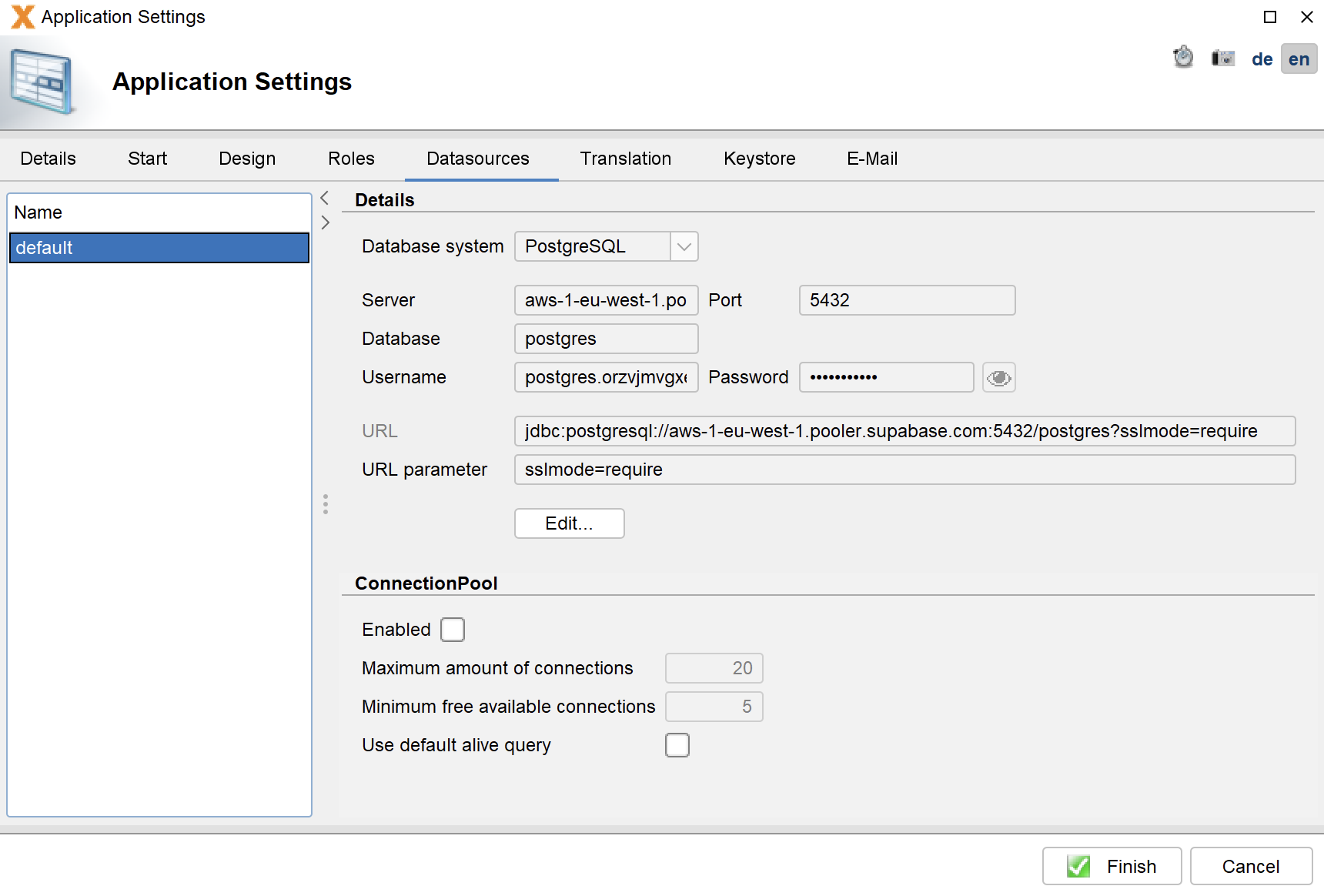
However, we tried the online version and simply registered for the Free Plan. The registration is very easy, and you are ready to go in 2 minutes. After registration, you simply create a new application with VisionX and connect it to the database using a custom data source.

The most complicated part was finding the URL. In our case:

Supabase connection

Supabase connection

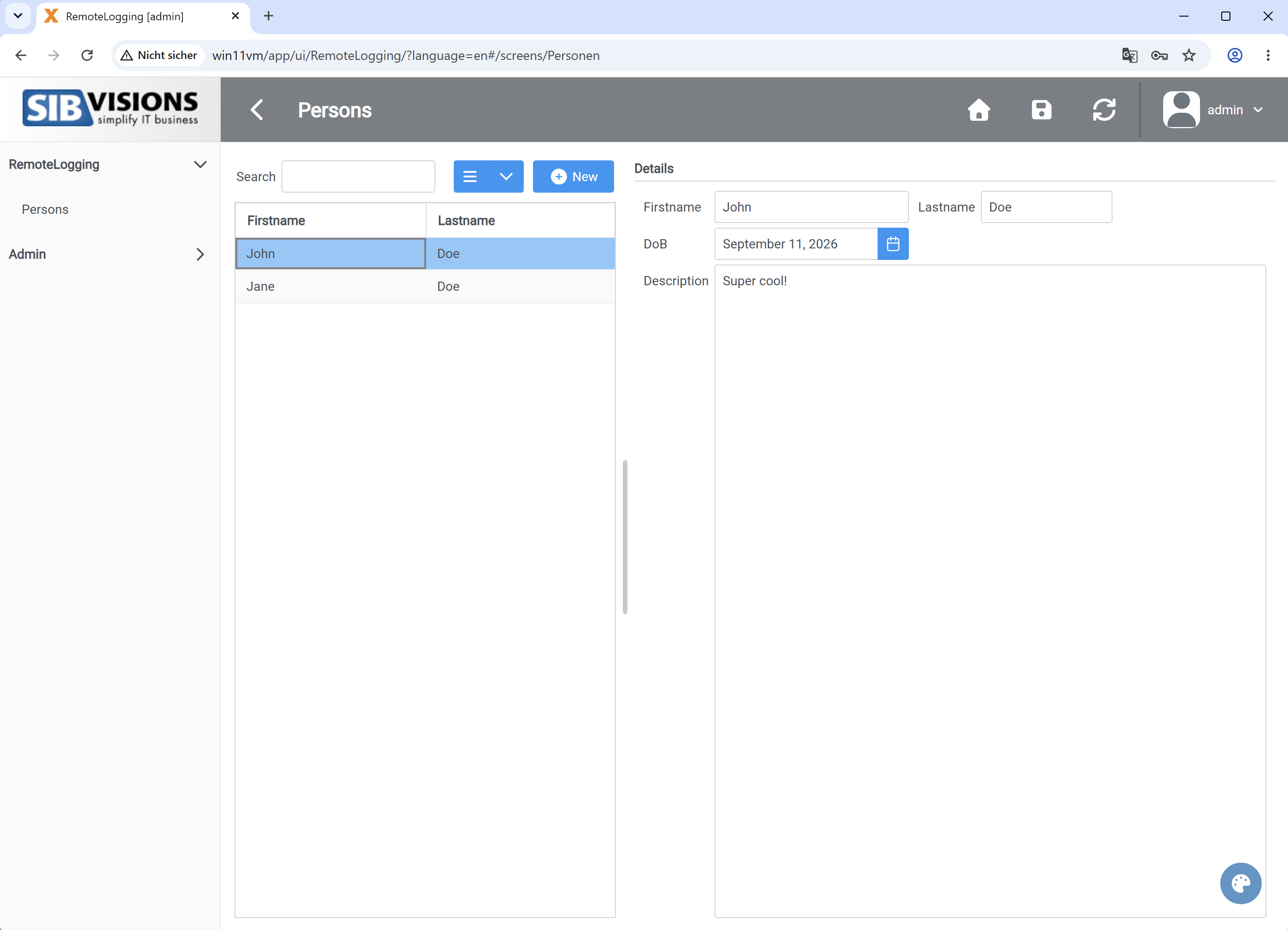
After the Supabase connection was configured, VisionX could be used as usual. We created a person mask for entering first name, last name, date of birth, and description. This was a simple test mask without any complex logic.

We then tested the features of the Supabase interface (creating new columns, modifying data, creating data models, REST API) and found no problems. Supabase is a practical solution, especially for VisionX applications.

The only thing that could be improved is the table editor, because when editing a column, you have to keep the focus on the editor before pressing ENTER to save; otherwise, the original value is saved. However, this might actually be intended :)

Of course, we could also install it as a web application as usual:

VisionX screen

VisionX application

We spent about 60 minutes with Supabase and were able to utilize all features of VisionX fully. The logging features and statistics provided by Supabase are particularly handy.

Our conclusion: VisionX and Supabase are a match!