This website uses cookies for visitor traffic analysis. By using the website, you agree with storing the cookies on your computer.More information

Category: Development

Javeleon Eclipse Plugin

If you use Javeleon for JVx applications and your preferred IDE is Eclipse, check out our new Eclipse plugin. It is the inofficial Javeleon plugin for Eclipse. The name of the plugin is Javilion Plugin. It is available on SourceForge and it is released under Apache License 2.0.

The plugin has two helpful features:

  • Reload Javeleon manually

    Simply reload Javeleon whenever you want.

  • Automatic Reload after resource file update

    The current Javeleon version(s) does not reload when you change a resource file like .properties, .xml, ... If you enable the Javilion plugin in your Eclipse project, reload happens automatically.

If you want to use the plugin, use the following instructions, because we have not setup an updatesite right now!

  • Download the plugin
  • Copy the jar to the dropins or plugins directory of your Eclipse installation
  • Restart Eclipse
  • Add Javilion nature to your project: right mouse click on your project, Javilion/Add nature
  • Right click on your project to verify that Javilion is added:

    Javilion Plugin

    Popup menu

  • Configure your application run configuration and add the port property to your javaagent, e.g.:

    -javaagent:D:\javeleon.jar=nbjdk=default;profile=java;port=9999

    The port 9999 is the default setting. If you need another port, configure it in your .project file:

    <buildCommand>
        <name>com.sibvisions.eclipse.javilion.JavilionBuilder</name>
        <arguments>
            <dictionary>
                <key>port</key>
                <value>1234</value>
            </dictionary>
        </arguments>
    </buildCommand>

    It is a little bit tricky, because we don't have a configuration UI for the plugin right now.

If you use the plugin together with a Javeleon ReloadListener (-Djaveleon.reload.listener=app.MyListener), you feel the full power of Javeleon.

VisionX 1.1.1 is released

We released VisionX 1.1.1 as little Thank you to our customers. Thanks for the great Feedback and for all the compliments!

The new release contains many improvements and solves some ugly problems.

The details

  • Application reload in Browsers

    It is not necessary to clear the Java or Browser cache. The application now reloads automatically.

  • Data export

    The simple export of records now creates valid CSV files. Simply open it with Excel or other Office suites.

  • Install the database without freeze

    VisionX had a problem with opened database connections, because the installation waits until all resources are freed. In the current release, VisionX closes all opened connections during installation. The database installation now runs smoothly.

  • Translation update

    We updated the English translation.

  • Tomcat Settings

    If you reused a Tomcat setting, the port is set to 80. Now the stored port is used.

  • User Management

    Now it is possible to customize the User Management screen.

  • Form screen validation

    If you close a form screen but not all required fields are filled, you get only one information dialog.

  • Default table sort

    If you sort a table with different columns and different sort orders, it is saved now.

  • Edit data table

    We found a potential freeze during screen update and changed the display of the data type.

  • Action editor

    A value change command does not create a new insert command anymore.

Have fun with this fantastic release.

JVx 1.1 beta1 is available

It is available from the project page.

What's different?

This beta release is an update release and contains not a lot of new features.

  • CSV Export uses client locale

    Before 1.1, we used a semicolon ";" as separator. Now we use a locale specific separator. This solves country specific data export problems.

  • Modal Internal Frames on MacOSX

    We solved the problem with resizable modal internal frames on MacOSX. Now the resizebox is always visible.

  • UITable readonly

    Now it is possible to set an UITable readonly independent of the IDataBook.

  • API changes

    We reverted the API change, made in JVx 1.0, because the implementation was not very clever. Now it is possible to extend the DBStorage and have full database independent support. In JVx 1.0 you had to extend the default DBStorage and the specific MySqlDBStorage and the specific PostgreSqlDBStorage.... was not very developer friendly. With JVx 1.1 you have the same features but without development overhead.

    Old:

    DBStorage dbs = getDBAccess().createStorage();
    dbs.open();

    New:

    DBStorage dbs = new DBStorage();
    dbs.setDBAccess(getDBAccess());
    dbs.open();

Check the Changelog for a complete list, and use our Forum to talk with us ;-)

PDF change metadata

Sometimes it is useful to change PDF Metadata.
The following code snipped is based on Add an image to an existing PDF

HashMap<String, String> hmpInfo = new HashMap<String, String>();
hmpInfo.put("Title", "CV");
hmpInfo.put("Author", "rjahn");

PdfDictionary dictTrailer = pdr.getTrailer();

if (dictTrailer != null && dictTrailer.isDictionary())
{
        PdfObject objInfo = PdfReader.getPdfObject(dictTrailer.get(PdfName.INFO));
       
        if (objInfo != null && objInfo.isDictionary())
        {
                PdfDictionary infoDic = (PdfDictionary)objInfo;
               
                for (Map.Entry<String, String>entry : hmpInfo.entrySet())
                {
                        if (entry.getValue().length() == 0)
                        {
                                infoDic.remove(new PdfName(entry.getKey()));
                        }
                        else
                        {
                                infoDic.put(new PdfName(entry.getKey()),
                                 new PdfString(entry.getValue(), PdfObject.TEXT_UNICODE));
                        }
                }
        }
}

pdr.getCatalog().remove(PdfName.METADATA);

Add an image to an existing PDF

Do you know the problem: You got a PDF document and want to add an image to a single page, but you have no printer/scanner.

Normally jPdf Tweak solves simple PDF problems, but it is not possible to add a simple image to a PDF file :( . It supports watermarks, but it is not supported to set the position or page.

I wrote some lines of code to solve my problem:

PdfReader pdr = new PdfReader("D:\\test.pdf");

PdfStamper pds = new PdfStamper(pdr, new FileOutputStream("D:\\test_image.pdf"));

PdfContentByte pcbPosition;

PdfGState pgsTransparency;

Image img;

for (int i = 1, anz = pdr.getNumberOfPages(); i <= anz; i++)
{
        //only first page
        if (i == 1)
        {
                pcbPosition = pds.getOverContent(i);
   
                pgsTransparency = new PdfGState();
                pgsTransparency.setFillOpacity(100 / 100f);
               
                img = Image.getInstance(FileUtil.getContent("D:\\image.png"));
               
                //x: 0 = left
                //y: 0 = bottom
                img.setAbsolutePosition(500f, 250f);
                //70 is 100%
                img.scalePercent(10);
                img.setRotationDegrees(0);
               
                pcbPosition.saveState();

                pcbPosition.setGState(pgsTransparency);
                pcbPosition.addImage(img);
       
                pcbPosition.restoreState();
        }
}

pds.close();

Use the current iText version or iText 4.2.0 (friendly license).

Oracle Forms and JVx - simply great

Oracle Forms is a great technology/platform to write database applications (for Oracle DBs) - There is no doubt!

But nobody knows how long it will exist! Oracle tries to replace Forms with ADF and or APEX, since years. APEX has limited functionality, ADF is too complex and is very "special"!

Have you ever tried to migrate an Oracle Forms Application to Java or .NET? Good luck :)
There are several tools that allows "automatic migration". But this is not more than an attempt!
Simple and small Forms Applications are surely migrated to another technology, but what is with the more important - large - applications?

We are not magicians, but have a modern technolgogy which enables a gradual migration.

Why is Oracle Forms so successful?
It is simple and does its job. You create User Interfaces for your Oracle Database very fast and ready for production. With JVx we offer a framework that solves the same problems but it is UI and database independent, is 100% Java and is Open Source.

And more...
Use JVx in your Forms applications.

Every developer knows that it is not so easy to replace a full-blown application with another one. Would it be cool to use existing features and Oracle Forms User Interfaces and integrate/implement new features and User Interfaces with JVx. Of course it would be very cool, but you need exactly one application that is consistent and still "simply works"!

And after all your Forms features are migrated, simply use a JVx application without Forms. You have no effort to switch, because it does not matter whether JVx runs with or without Forms!

Are you curious?

I assure you that no other framework is better suited than JVx.

Why?

  • Re-use your existing database logic (triggers, packages, views, functions, procedures) without changes.

    It is possible but not necessary to move your business logic to the server tier (middleware). Of course, it is recommended, if you plan to replace your Oracle database with antother database system. To be honest... Oracle has a damn good RDBMS.

  • Why sould you create tons of source code and use ORMs if your data model is clean.

    I'm sure you want maintainable applications - as usual?

  • Money, money, money

    Use your preferred Open Source application server and don't pay expensive license fees.

  • And one of the most important things: You don't need a new development team.

    What happens if you decide to replace your Forms Application with ADF? Have your developers the needed skils?

Do you need an example?

Oracle Forms with JVx

Oracle Forms with JVx

The example uses JVx UI (layout, panel, table, button), the generic model, a remote connection and life-cycle objecs as usual. Not bad ;-)

And if you want to develop faster than ever before, use VisionX on top. You have never used a better Application development tool!

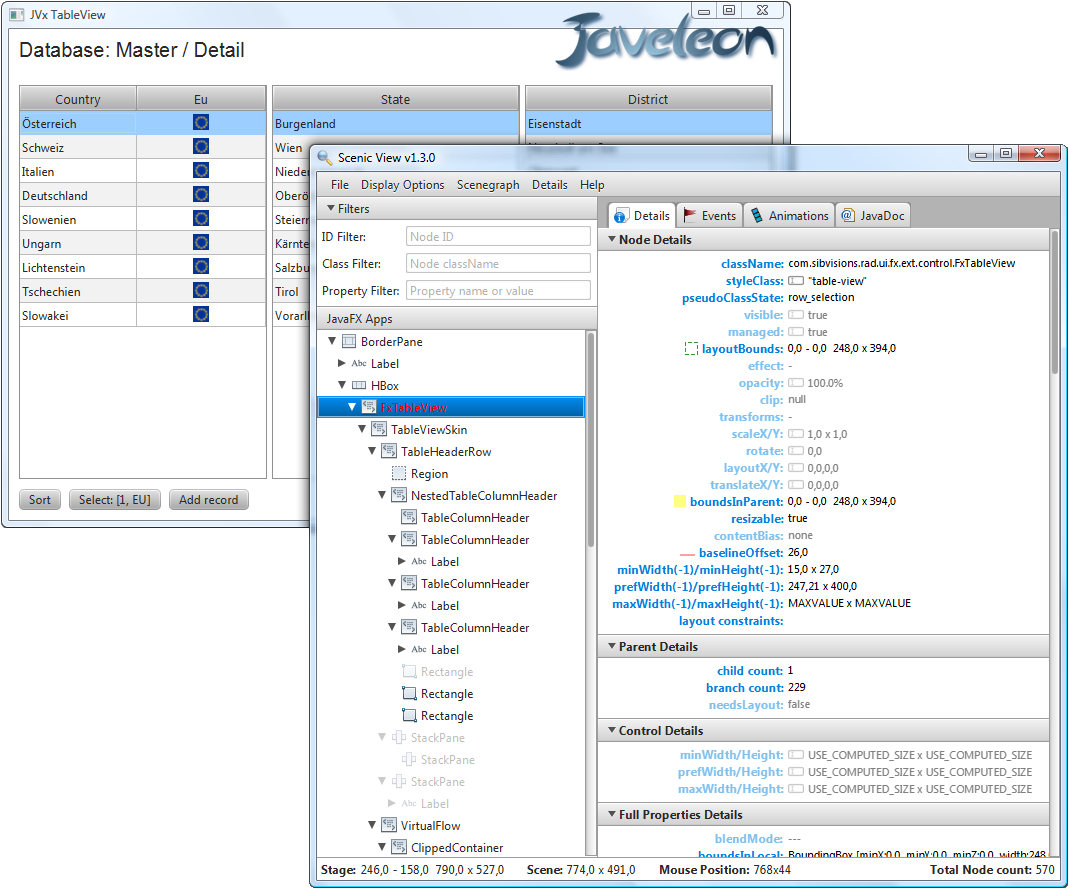
JavaFx 2.0 - TableView connected to a Database

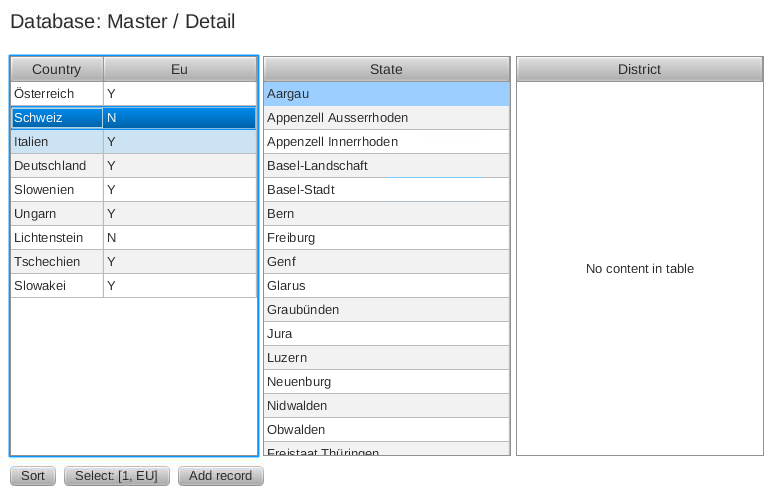
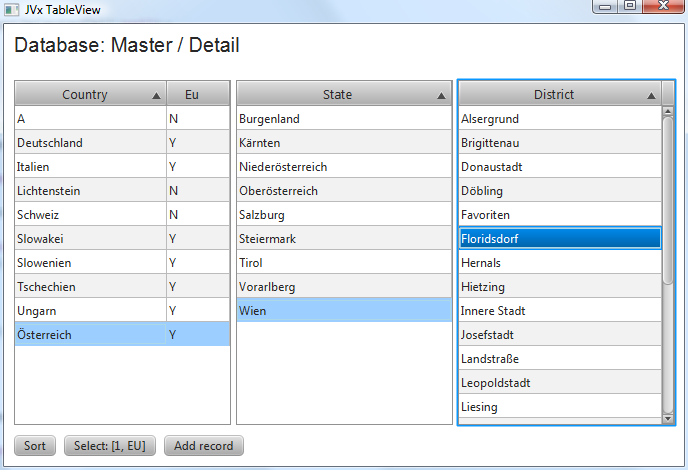
We made some tests with TableView and missed productivity features like Load-on-demand and database support. So we tried to use our DataBooks with a TableView. We need a TableView that is re-usable and shows data from remote storages like databases or csv files. It should support multi-column sorting and of course, load records on demand. A nice feature would be support for edit data without boilerplate code.

Our first simple use-case: Show records from a database table

The result:

TableView with IDataBook

TableView with IDataBook

The implementation is not finished and is more a PoC, but it works great! The source code is available here.
It is also possible to edit data, but the different datatypes are not yet supported!

Simply use the table view to show dynamic content. Allow editing without additional source code. Don't re-invent the wheel again!

The source code of the test application is available here.

JavaFx 2.0 and Business Applications

JavaFx 2.x has some nice UI components. It has new APIs and it is completely different to Swing. Of course, you can mix JavaFx components with Swing components, but the LaF is not the same! The new styling mechanism of JavaFx are really great.

But for me, its not a big step forward in the evolution. It is another UI library, of course a visually appealing. I miss an application framework or components with built-in support for modern applications. From my point of view, there is not enough focus on business applications. A business application is not a simple table or chart with some nice looking bars. A business app should handle millions of records, should allow keyboard navigation in all variants, should be fast, should save costs and time.

What should be different?

A standard JavaFx 2 application looks very nice because the standard style is modern. Also styling options are better than ever.

For me, the whole API is too much focused on Lists, POJOs, Generics and Object Bindings. Of course, it is cool for small apps, but you waste time with boilerplate code. If you have a database application with 5 simple tables that contains master data, and you need edit screens, you duplicate your source code 5 times because you have no support for dynamic usage. If you work without Generics, it is not really funny because JavaFx uses it everywhere.

Load-on-demand of records is possible if you do it manually, but it is not included in the controls. "Touch-scrolling" would be great. Compared to other UI libraries (swing, swt, qt), you can't change the default operation of UI controls because you don't have access to internal listeners, scrollbars, Behaviour, ... Some parts are customizable but these are more the exception.

The whole event handling is sometimes very complex, because you don't know what event type you have to use, where the type is declared and which event is the correct one. And inner classes are not the best solution for clarity. Because of Generics you have a lot of configuration work and you are not sure if everything works as expected. Without powerful IDEs you have no chance. Sometimes you have events but nothing happened....
That parts are not the real problem because it requires a certain amount of time to understand new classes. But must things always be complex rather than simple?

But it is great to write source code instead of crazy scripts.

What else?

The version number 2 is too high, because it is still not mature. JavaFx shows what is possible (scene graph, effects, web and video content) but it is not simple to use. But maybe it is perfect to combine only some parts with other mature toolkits like Swing or Swt?

It is not the library that bothers me, but it brings little relief for a developer. Why not just use Pivot? Yes... the web view is powerful ;-)

What should be done?

Focus on Business applications. Integrate an application framework that saves development time. Controls should not be so restrictive!

Migration from Eclipse Galileo to Indigo

We use Eclipse Galileo for all our projects. It has some problems with CPU load if you use Subclipse with large Java projects. But if you disable SVN decorators, it is ok (not perfect, but still better than the rest)...

We don't use every new Eclipse version for development because it needs a lot of time to check and change our projects. Don't believe that everything works out-of-the-box.

In the last days, we tried to update our Android plugin and... the new version does not support our "old" Eclipse version. We need at least Eclipse Helios... sh*t. We opted for the update, hoping that it does not take too much time.

Installation of Indigo and all our plugins was straight forward. But the "new" JDT have some side effects. It was not possible to compile JVx because KeyValueList and IdentityKeyValueList have a "Name clash". The problem details are described here. Not an Eclipse problem, a generics problem. But even that is not great.

After we set the compliance level for JVx from 1.5 to 1.6, it was possible to compile the project. Now we have Name clash warnings instead of errors. Not great but we can live with it. After we "solved" the first problem we had the next with our Web projects, because the Project Facets use Java 1.5 compliance level. But we learned that it is enough to set the level to 1.6 :) . To set the level from 1.5. to 1.6, we had to change the JRE for our Server environment(s) from 1.5 to 1.6. It is not a problem to use 1.6 but JVx is 1.5 compatible and it is not great to test without 1.5, but it is what it is.

Most of our projects are now migrated and again it was not funny to search "no" problems. We look forward to the next waste of time.

If you need details about our migration steps, write a comment ;-)

JVx 1.0

We proudly present JVx 1.0!

What a year... The first release of VisionX is out, and we finished our work on JVx 1.0.
This release is awesome. It contains a total of 230 changes to 0.9.

We implemented really cool productivity features, some fancy UI features and we fixed some bugs. But the complete list is really long :)

Our original Roadmap for 1.0 had fewer Features, but thanks to the community, JVx 1.0 now contains a lot of wonderful things.

In the following weeks we plan to write more documentation especially about the new features and update our showcase and demo apps. It is not possible to write about everything in this posting - and it is also Christmas. One of the next postings will be some statistics about the JVx source code - LoC, quality, ...

We think it is also time for more WebUI... maybe another implementation... let's see. And of course, mobile devices are still very interesting. We started first attempts with Android some months ago. We made some POCs with Pivot and JavaFx 2.0 and who knows what the next year brings.

And we have still a lot of new ideas to speed-up the development time. Without JVx 1.0 you develop as fast as possible - but with JVx 1.0 you develop with the speed of light.


Now, a very short look at JVx 1.0

  • Database
    • Support for PostgreSql and MySql enum datatypes (automatic link cell editors)
    • High performance metadata cache
    • Block fetching
    • Scriptable db import scripts
  • Server
    • REST support for all objects and actions
    • DetachedSession and DirectServerSession introduced
    • DirectObjectConnection introduced
    • Transparent config encryption
    • LCO based security checks
    • Reduced communication requests
    • Better support for custom storages
    • Support for custom session manager and object provider

  • User Interface
    • Intuitive link cell editors
    • New cell formatting with image and insets
    • JNLP services integrated
    • Focus rect handling
    • En/Disable translation per component
    • New Locale handling


You find the complete list in the Changelog.

And last but not least, we look forward to your feedback!