It is available from the project page.
This version should be the last beta before release 1.0, but we changed our plan a little bit. VisionX starts the open beta phase in the next weeks and we want release VisionX 1.0 with JVx 1.0. Because of that, we extend the beta phase for JVx. The current beta of JVx is almost production ready but does not contain all features for 1.0.
A short delay should not be a problem for you, and our beta releases are always in high quality.
What’s different?
The current beta contains some very useful productivity features and a lot of important changes in our database access layer.
- AbstractBean serialization
Our AbstractBean is an instance of Map and because of that we serialized objects as Map. That worked well but produced a ClassCastException when you tried to cast the serialized object to the wrong type. Now it is clean!
- StackTrace manipulation
Stack Trace Elements of SecurityExceptions are now shrinked, because it is not clever to show all details on the client. If you need the whole Stack Trace, enable debug logging for AbstractSecurityManager.
- Live config
In production use, a Master session caches the application configuration and changes are not considered until you create a new Master connection. If you need up-to-date sessions, you have now an option. Add:
<liveconfig>true</liveconfig>
to your server config.xml.
- Virtual Filesystem support
Versions prior 1.0 beta-3 have deployment restrictions for some application servers. JVx works without problems with all application servers but e.g. JBoss uses two different deploment modes. As application archive (.war) or "exploded". If you tried to install a JVx application as war, you had the problem that config files were not found. The problem does not occur if you install the application "exploded". With the current beta, the problem is solved and JVx applications work as war or "exploded".
- Openness
We introduced a new ISession implementation called DetachedSession. With this Session it is possible to work "outside" the JVx lifecycle. You can create a DetachedSession from a Servlet, a Filter or wherever you want. All you need is the application name. The session has its own SecurityManager and allows fast username switching. You need at least one DetachedSession for your external services. Thats saves time and memory.
The AbstractSecurityManager got new methods to create SecurityManagers for any ISession or just for an application name. You can now use the JVx authentication mechanism for you third party services, without much coding effort.
Furthermore, our DBSecurityManager allows connection access. Use the connection of the security manager to save connections.
A practical example for above changes is the integration of REST services, with or without authentication. Now it is enough to create a new DetachedSession and use the configured security manager to authenticate clients, e.g.:
DetachedSession sess
= new DetachedSession
("demo");
DBSecurityManager secman = (DBSecurityManager)sess.getSecurityManager();
sess.setUserName("jvx");
sess.setPassword("beta-3");
secman.validateAuthentication(sess);
sess.setUserName("visionx");
sess.setPassword("v1.0");
secman.validateAuthentication(sess);
Connection con = secman.getConnection();
//Execute queries
- Database access
We fixed some problems with PK, FK and UK detection for all supported databases. Now our automatic link cell editors work without database restrictions.
Check the Changelog for a complete list, and use our Forum to talk with us 
We have a cool new JVx feature for all developers! It has always bothered us that the Link Cell Editors are not visible in the tables. You don't see the difference between date/text/number and link cell editors. Now you see the difference!
I hope you find the difference in the following screenshot
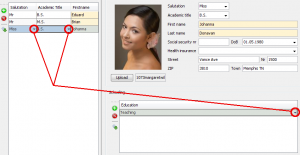
Link Cell Editor mark
The new feature is available with JVx 1.0 beta 3 or in our source repository.
It is available from the project page.
What’s different?
This beta release contains important bugfixes for database access and brings some useful utility methods. It was a lot more work as expected, to solve the problems, but now we are very happy with it. Beta-2 is a smaller update, compared to beta-1 but we are already working on beta-3.
And of course we are also working under high pressure on VisionX. The tool is so amazing. Application development of the next generation. We have some really cool videos for you on our YouTube channel. Feedback is always welcome.
Check the Changelog for a complete list, and use our Forum to talk with us
It is available from the project page.
What’s different?
The current version is our first release on the way to 1.0. It contains not a lot of new features and most of them are in the backend. We had a lot of work with some Problems with our DataBook in DataSource Writeback Isolation Level and with Multi Threading. But we are very satisfied with the release!
- DataSource Isolation level
Compared to the DataRow Level, a DataBook does not save immediate. The mix of databooks with DataRow and DataSource Level with different master references caused problems. Now it is not a problem to use different levels. It is great to use 1:n, n:m or even 1:1 relations with DataSource level, but call save when needed!
- LifeCycle Objects
If your LifeCycle objects extends from GenericBean, the destroy() method is now invoked after the connection is closed. If you don't extend from GenericBean, you can use the ILifeCycleObject and implement destroy(). It is now possible to close connections to remote systems or execute cleanup tasks. Note that DBAccess automatically closes the database connection.
- Conditions
The Conditions LikeReverse and LikeReverseIgnoreCase are new and work as follows:
Like: column-value like user-value
LikeReverse: user-value like column-value
- Access control
It is now possible to use a custom IAccessController for your DBSecurityManager. Simply set the full qualified class name in your config.xml:
<application>
<securitymanager>
<accesscontroller>com.sibvisions...</accesscontroller<
...
- Security Managers
Security Managers have now a release method. This is important if you want to change the security manager because now it is possible to free all used resources.
- Cell formatting
It is now possible to configure images for rendered cells. Image and Text combinations in cells are now supported.
- Utilities
We added some useful methods to ResourceUtil, FileUtil, StringUtil and ArrayUtil. Introduced the new class TriggerAPI for server-side triggers.
- Changes to 0.x
- XmlNode.getValue() for an attribute with an empty value returns now null instead of an empty string.
- UIImage.getImage("invalid") returns null instead of an UIImage instance without content. Be aware of NullPointer Exceptions.
- logout method of ISecurityManager is only called for MasterSession and not for SubSession. Before 1.0 is was called for all Sessions.
- estimatedRowCount of IStorage was renamed to getEstimatedRowCount
- ResourceUtil searches local files only from directories which contains jar files and not for directories which contains class files. Now logging.properties per project are supported.
Check the Changelog for a complete list, and use our Forum to talk with us
The UI framework Pivot offers modern UI controls and renders very clean and fast. It has very powerful features and we made a very simple load-on-demand TableView implementation. We used our JVx model, especially IDataBook, for the integration.
The result is a table that loads the data from a database (scroll down to see what happens). The database table contains about 170,000 lines.
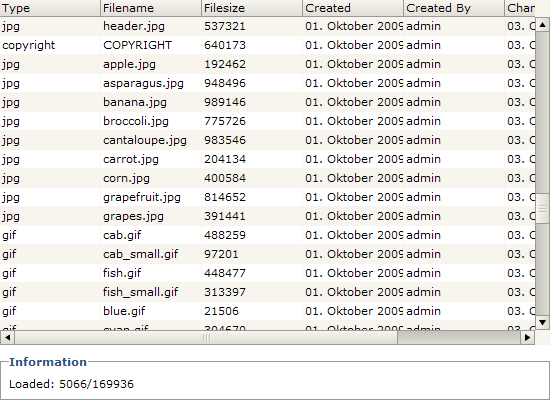
Click to start the application
The above example uses the same database as our Showcase application.
The Source Code is Open Source and available via SVN, on our JVx Project page.
We found a nice article about a simple CRUD application, created with JSP/Spring/Hibernate - read more....
This example is great for a comparison with JVx, because JVx is perfect for CRUD applications.
We used our existing app JVxFirstApp as reference because it is comparable to the Spring app. Our app has some extra features like authentication and a specific security manager, but that does not change anything.
Both applications provide CRUD operations on a table called CONTACTS. A big difference is the used technology: Web (JSP) vs. Desktop (Swing), but it is no extra coding effort to start our app as Web application - with our WebUI.
Why the comparison?
A big advantage of JVx is to simplify application development specifically of database applications. We want to show the difference in complexity and compare some statistics.
Let's start with the statistics:
| |
|
JSP/Spring/
Hibernate |
|
JVx |
| Files |
|
17 |
|
9 |
| LoC |
|
265 |
|
208 |
| Config lines |
|
74 |
|
15 |
| JSP lines |
|
230 |
|
- |
| Libraries |
|
37 |
|
2 |
We used the same code formatter for both projects, therefore the Lines of code should be meaningful. The config files do not contain a lot of empty lines and the jsp files are standard html. We counted every line.
As you can see there is a big difference. Less lines of code do not automatically mean less complexity, but in this concrete example is it so. If your application has few lines of code, it is easier to understand how things work together and it is easier to maintain your application. And if you are a beginner it is better to get fast results without losing the control. That is the case if your project contains many files.
And if you are not a beginner it is important that you have the best flexibility with your framework. Both technologies allow the unrestricted use of other frameworks. But more dependencies means more problems if you plan to update to newer versions. The testing effort should not be underestimated. Fewer dependencies are an advantage!
What is your opinion?
We proudly present JVx 0.9!
This release of JVx contains about 190 changes 
Originally we wanted to move some features to 1.0 because they needed a considerable amount of time, but we kept them for 0.9 because each feature is great and saves a lot of work... And now, some months after JVx 0.8 we have a very powerful JVx with tons of new features, performance improvements and still very simple and small. We don't know a framework with approximately the same features as JVx which is about 900Kb. If someone knows a framework, please let us know!
And before we continue with some new features, many thanks to all the database vendors We had a lot of work with different Standard interpretations (quoting, case sensitive, OS differences, imcomplete JDBC implementations, ... )
What's new? ...too much to describe everything in one post, but let's start:
- Database
- Manual quoting via DBStorage, if you need specific database features and don't change the database
- Automatic quoting via DBStorage, if you plan to change your database or if you use a storage for different databases
- Change your database(s) without changing you client code read more...
- Use existing java.sql.Connection instances to create DBAccess instances
- PK, FK, UK detection with or without JDBC driver, when needed (DBAccess dependent)
- Server
- Introduced DBCredentials and DataSourceHandler to change DB connections without changing source code read more...
- Default storage implementation for automatic caching (AbstractCachedStorage)
- Default storage implementation for memory data (AbstractMemStorage)
- Server side triggers and POJO support for storages read more...
- Use custom SessionManager and ObjectProvider implementations
- Global meta-data caching read more...
- Better Exception handling for debugging
- User Interface
- Simple charting
- Default layouts for Container
- Save UIImages
- Changed automatic (master/detail) link editor visibility
- Introduced TreePathFinder
- login/logout event handler for applications
- Modern Message layout
- Border on/off option for TextFields
- Translation for Cell Editors (e.g. Date/Time Picker)
- Utilities
- Added FileUtil.replace, FileUtil.zip, FileUtil.unzip, FileUtil.copy (directories and files), FileUtil.move, FileUtil.delete (directories and files)
- Added StringUtil.getCharacterType, StringUtil.getCaseSensitiveType, StringUtil.replace (faster than String.replace)
- Added <XmlNode>.toString(boolean), <XmlNode>.getXmlValue, <XmlNode>.indexOf (deep search)
- Added CommonUtil.getFirstCause, CommonUtil.equals (supports null comparison)
- Added ResourceUtil.getResource and ResourceUtil now supports different ClassLoaders
- Added simple namespace support for XmlWorker
- XmlWorker has a new option for writing line-feeds between tags
- Added <FileSearch>.searchFirstFile and support for file/directory pattern search
The above list contains only some cool changes. You find the complete list in the Changelog.
But that was not all.... We added some new features to our WebUI and released the second beta, which is fully compatible with JVx 0.9.
Our Showcase application is up-to-date and uses JVx 0.9 and WebUI 0.8 beta-2.
And last but not least, we look forward to your feedback!
Some days ago, we updated our showcase application and especially the WebUI implementation.
But what is new?
Our WebUI has some great new features, in addition to our Plat_Forms release.
Check out the Help menu - the help is now embedded in the application. Another great feature is the download option for grids - press the small export button beside the grids. Or try uploading an image in the contacts screen - works great
Smaller changes are grid specific, e.g. the sort operation is now a remote operation, same for inserting new lines.
We welcome your feedback!
Because of the Plat_Forms competition, we released special versions of JVx, WebUI and OnlineHelp. All releases are available from our project page.
We implemented some amazing new features for JVx and WebUI.
Check out the changelogs for details.
Some tags:
- Simple charting
- Default layouts
- Global metadata caching (server-side)
- Modal frames in WebUI
- Table handling in WebUI
It is available from the project page.
What’s New?
The complete list of changes can be found here.
- Default Database (CoC)It is now possible to configure multiple db datasources via config.xml
<?xml version="1.0" encoding="UTF-8"?>
<application>
<securitymanager>
<class>com.sibvisions.rad.server.security.DBSecurityManager</class>
</securitymanager>
<datasource>
<db name="default">
<url>jdbc:oracle:thin:@localhost:1521:mydb</url>
<username>user</username>
<password>password</password>
</db>
</datasource>
</application>
If the DBSecurityManager does not define a specific datasource, the datasource with the name "default" is used.
- Quoting in DBAccessDBAccess supports case sensitive database access. To enable the feature, call
on your DBAccess instance.
- Custom SessionManager and ObjectProviderIt was possible to use a custom ObjectProvider but it was not possible to extend the DefaultObjectProvider. Now this limit is gone. Additional it is now possible to use a custom SessionManager and extend the DefaultSessionManager.
Configure the objects in your server config.xml like this:
<server>
<sessionmanager>com.sibvisions.AnotherSessionManager</sessionmanager>
<objectprovider>com.sibvisions.AnotherObjectProvider</objectprovider>
<server>
- Server Side TriggersOur DataBooks now supports specific events like before insert or after delete. The server side storage did not have this events, so you had to overwrite the data manipulation methods to call your business logic or to change the default behaviour. That was not very cool.
We have implemented a very powerful feature, with which you have full control of your data sent to the data tier. Do you know database triggers?
Now you have the same power in your storages.
A short example:
public void getUsers
()
{
DBStorage dbsUsers
= new DBStorage
();
dbsUsers.
setDBAccess(getDBAccess
());
dbsUsers.
setFromClause("V_USER_USERS");
dbsUsers.
setWritebackTable("USERS");
dbsUsers.
open();
dbsUsers.eventBeforeInsert().addListener(this, "doEncryptPwd");
dbsUsers.eventBeforeUpdate().addListener(this, "doEncryptPwd");
}
public void doEncryptPwd(StorageEvent pEvent)
{
IBean bn = pEvent.getNew();
bn.put("PASSWORD", AbstractSecurityManager.getEncryptedPassword(
SessionContext.getCurrentSessionConfig(),
(String)bn.get("PASSWORD")));
pEvent.setNew(bn);
}
Use the event handling as usual.
- Flat POJO support for StoragesInstead of using the dynamic property access via IBean, it is possible to work with POJOs:
public void doEncryptPwd
(StorageEvent pEvent
)
{
User user
= pEvent.
getNew(User.
class);
user.setPassword(AbstractSecurityManager.getEncryptedPassword(
SessionContext.getCurrentSessionConfig(),
user.getPassword()));
pEvent.setNew(user);
}
You can work with every useful POJO because the storage mapps only available properties to the POJO.
- Useful bugfixes
We look forward to your reviews

 Development, News | rjahn | 01/08/2011 |
  Comments (0)
 RSS-Feed